


Compare the price of a Magic deck store by store
By The Tapt team · updated
Paste your decklist and Tapt finds the best price for each card, the total per store and the way to pay the least while visiting as few stores as possible.

You have a decklist and you want to know what it costs to put together in Quebec. Searching for the cards one by one across a dozen stores takes a long time, and the result is misleading: the cheapest card is not always in the store that will cost you the least once shipping is counted. The Tapt deck comparator answers that question in a few minutes: you paste your list, it searches for each card in the stores you picked, gives you the best price of each, the total per store, and a purchase suggestion that accounts for shipping costs.
This guide follows the whole path: preparing the list, specifying the edition or finish when it matters, reading the three result sections, understanding the optimal purchase suggestion, filling your cart at the stores and keeping the list for later. Nothing is paid and no account is needed to compare.
Preparing your list
Open the deck comparator page. On the left, the "Your decklist" area expects one card per line. The quantity is optional (1 by default), and several spellings are accepted:
- `4 Lightning Bolt`
- `4x Lightning Bolt (M10)`
- `4 x Lightning Bolt`
If you export your list from a collection or deck management app, paste it as is: the common formats, including those of ManaBox and MTGO, are recognized. You can also import a CSV and export to CSV the list you just built. A "See an example" link fills the area with a small list so you can try the tool before pasting yours.
An "Include the sideboard" box adds the sideboard to the analysis. Leave it unticked if you only want to compare the main deck: for a Commander deck that is almost always the case, since the command zone and the sideboard do not play the same role.
Specifying the edition, finish or condition
By default, Tapt looks for the card without caring about the printing. That is perfect when you do not insist on a particular version. When you want a specific printing, you write it in the line:
- the edition and collector number in parentheses, for example `(DKA) 85`;
- `F` for a foil card and `E` for an etched card;
- the condition in square brackets, for example `[LP]` for Lightly Played.
In that case, Tapt looks for that exact printing, including the alternate art. The Condition selector in the panel, with its choices All, NM, LP, MP, HP and DMG, then only serves as a fallback for the cards in your list that have no marker. A line can combine everything: `1 Sol Ring (C21) 263 F` asks for the foil Sol Ring from Commander 2021 bearing the number 263. To find a printing's set and number, the guide to exploring Magic sets shows where to read them.
If the exact version is missing at a store, Tapt tells you instead of showing nothing, and suggests the closest one.
Choosing stores and launching the analysis
Under the "Analyze the deck" button, the "Stores" panel shows the number of stores ticked (157 out of 157 as these lines are written) and offers the shortcuts "All" and "None". If you saved favourite stores in your profile, they are ticked in advance.
When you launch the analysis, Tapt searches for each card one after the other. The button shows the name of the card in progress and a percentage. Each store gets a status: cards found, no card from the deck, suspect, error or timeout. The "suspect" status flags a result to check rather than believe with your eyes closed. If the analysis is interrupted, a "Resume the analysis" button picks up where it stopped.
Reading the three result sections
The results split into three blocks, from the most detailed to the most practical.
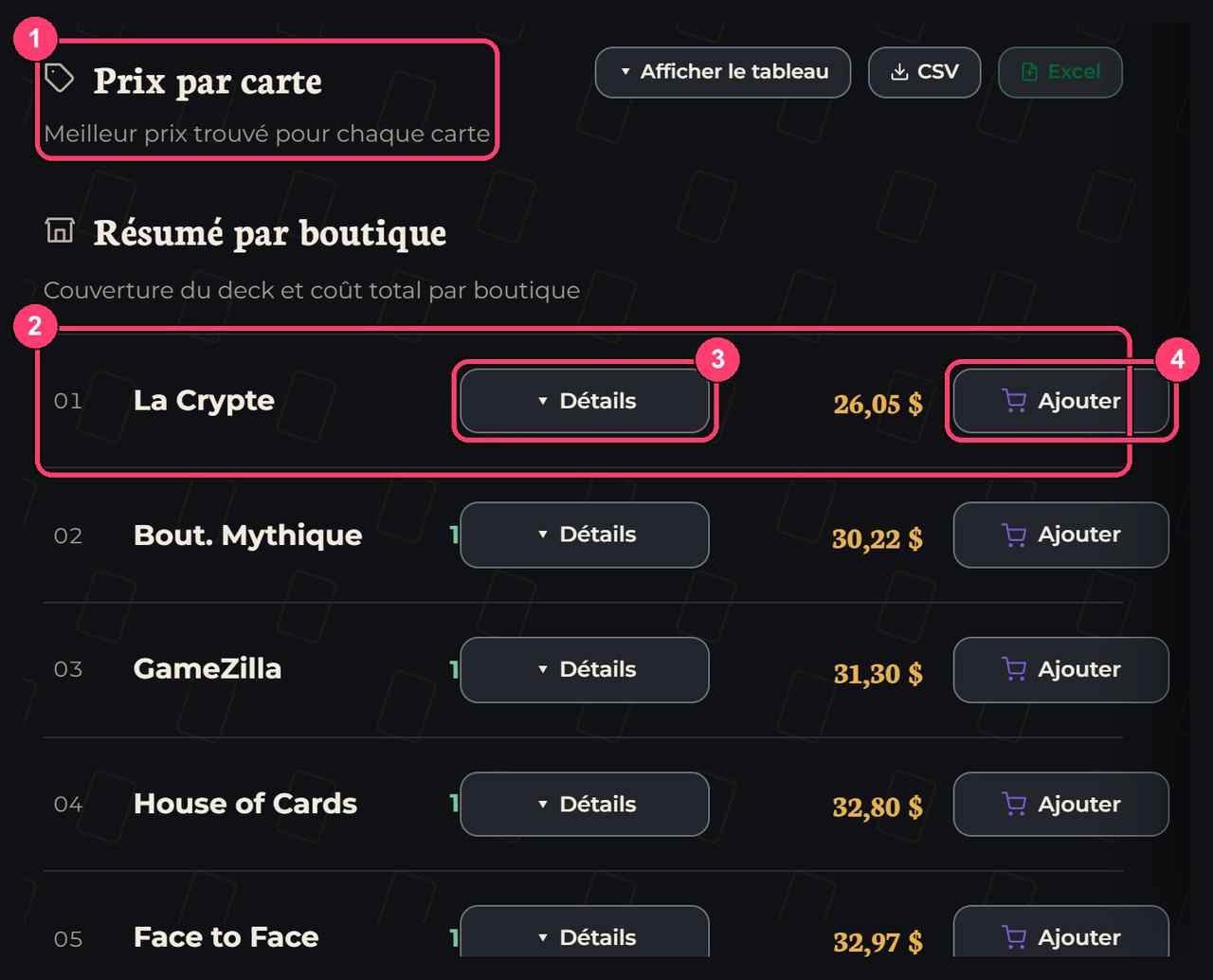
Price per card. A table gives, for each card, the best price found: the photo, the quantity, the store, the edition, the unit price, the subtotal, the condition, the finish and the stock. An "Add to shopping list" icon sits next to each row. You can export the table to CSV or Excel. When the best price of a card corresponds to a damaged copy, a yellow warning says so plainly and reminds you to pick a condition in the filter to see only cards in better condition. In the example screenshot, that is the case of a Lightning Bolt in HP condition.
Summary per store. One row per store: the share of the deck it covers (as a percentage and a number of cards) and the total cost. A "Details" button unfolds the covered cards and the missing cards, and an "Add" button sends to your shopping list every card that store has, at the quantity the deck asks for.
Optimal purchase suggestion. Tapt looks for how to split the purchase among stores to pay as little as possible, shipping included. That part deserves its own section, below.
A concrete example, with numbers
The site's example list contains eight cards: four Lightning Bolt, one foil Sol Ring from Commander 2021, two LP Cultivate and one Wrenn and Six. At the time of the screenshot, several stores cover 100% of the list: La Crypte at $26.05, the cheapest, and GameZilla at $31.30. The gap between these two stores is more than five dollars for exactly the same cards, almost 20% more.
That gap is nothing extraordinary. It comes from the fact that each store sets its prices on its own, according to its stock and its customers. On a hundred-card Commander deck the effect multiplies: a few dollars on each key card, a free-shipping threshold reached or not, and the bill moves by several dozen dollars. That is the whole point of comparing the full deck rather than card by card.

The optimal purchase suggestion
Buying the whole deck in a single store is simple, but not always the cheapest. Buying each card at its lowest price in a different store is the opposite: unit prices are low, but each parcel adds its shipping fee. The optimal purchase suggestion looks for the balance between the two.
It compares the following situations and tells you what happens in yours:
- One store has all your cards. Tapt tells you how much buying everything there would cost, shipping included, and checks whether splitting the purchase would lower the bill. When it would not, it says so: "taking everything there is already your cheapest option, no need to split the purchase".
- No store has everything. You have to shop elsewhere anyway. Tapt computes the split that costs the least while accounting for shipping and shows you how much you save compared to buying "everything at the lowest price, without worrying about shipping".
For each store in the split, you see the cards to take there, the subtotal, the shipping fee (or the "Free shipping" mention when the threshold is reached) and the expected total. A bar separates the share of the cards and the share of shipping in the cost. Taxes are not included, and when a store's shipping is not available, the suggestion says so rather than making it up. Each store in the split has its own "Add" button to send its cards to your shopping list.
Filling your cart at the stores
Once the split is chosen, your shopping list holds each store's cards. You click "Open at a store": about half of the stores receive your cards directly in their cart. For the others, their website does not allow filling a cart from the outside, and Tapt opens one tab per card, where you click "add" each time. On a sixty-card deck, that gets heavy.
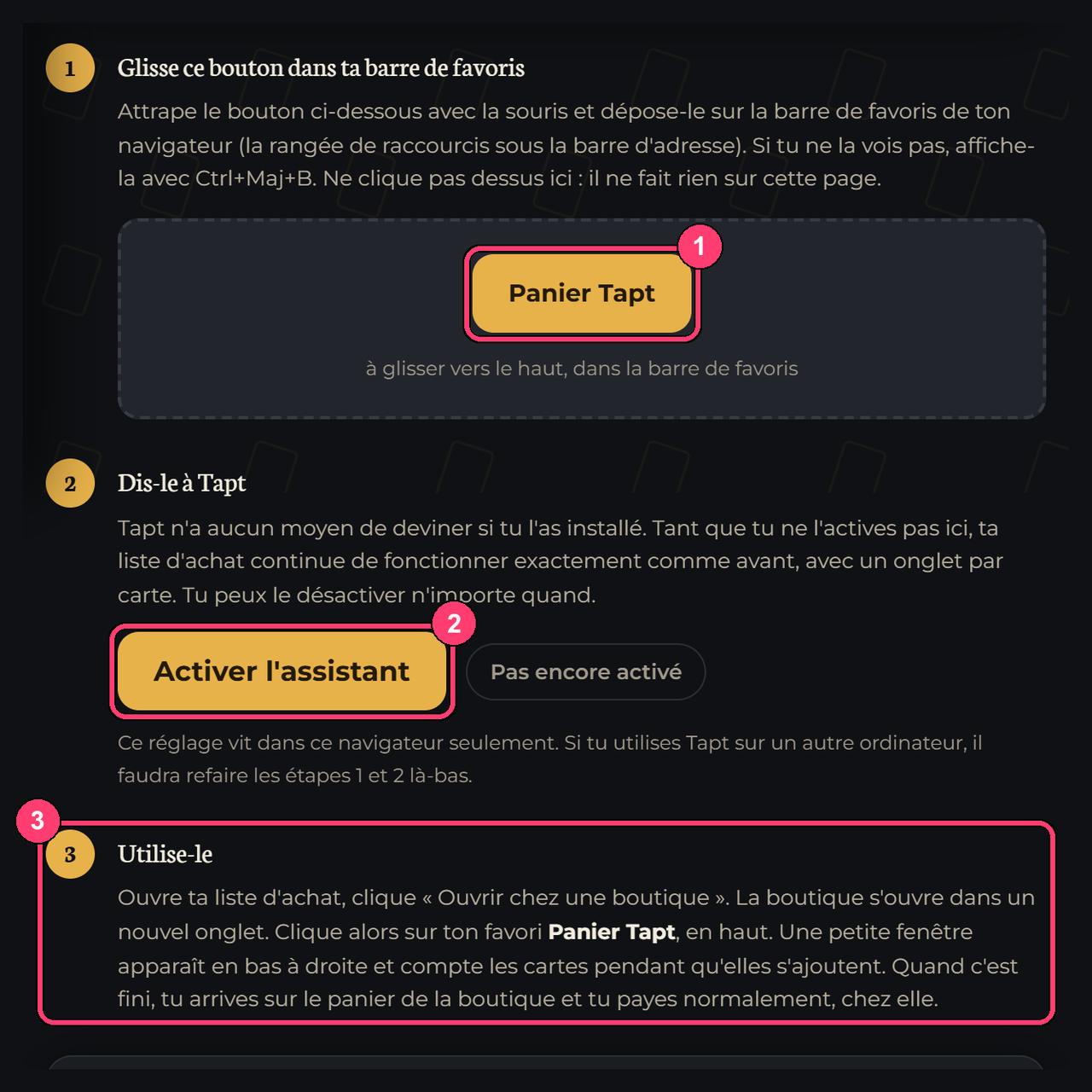
The cart assistant solves this problem on nine stores. It is a browser bookmark you drag once into your bookmarks bar: on the store, one click on it adds your cards one by one, tells you what went through and what was no longer in stock, then takes you to the cart. It never touches your payment or your address, and it only runs when you click it. It is made for computers: on phones, bookmarks of this kind are not reliable.
The shipping fees and thresholds Tapt uses are those of the Shipping fees by store page. Since stores can change them without notice, always confirm the final amount on their website before paying.
Keeping the list as a deck
Once the analysis is finished, a box offers to keep your list as a deck. Without an account, it stays in your browser for a few days. With a free account, it becomes a deck you find everywhere, with its value computed at local prices. From there you can edit it in the editor, share it or compare it again later when prices have moved. The editor is in the decks section, which also serves to build a list from scratch.
If your deck is a Commander deck, also think about placing its power level with brackets: the article Commander brackets explained tells you how. And if a key card is still too expensive today, do not pay for it reluctantly: track its price and let Tapt warn you when it drops.

Tips for a reliable comparison
A few habits avoid most bad surprises:
- Compare the complete deck, not only the expensive cards. Small cards add their shipping fee when they travel alone.
- Pick a condition before letting a price seduce you. An HP or DMG copy can cost half of an NM version. Sometimes that is exactly what you want, but it must be a choice.
- Specify the edition of the cards whose artwork you care about. Without a marker, Tapt keeps the best price, whatever the version.
- Rerun the analysis before paying. Prices and stock move. Last week's comparison is no longer a comparison.
- Check the final cart on the store's website. Shipping, taxes and stock are confirmed there one last time.
Frequently asked questions
How does the deck comparator work?
You paste your decklist, tick your stores and launch the analysis. Tapt searches for each card one by one in the chosen stores and gives you the best price found, a total per store and a purchase suggestion that accounts for shipping.
Which list formats are accepted?
One card per line, with an optional quantity: `4 Lightning Bolt`, `4x Lightning Bolt (M10)` or `4 x Lightning Bolt`. The ManaBox and MTGO formats are recognized, and you can also import a CSV.
Does it work for a 100-card Commander deck?
Yes. Paste all hundred cards, commander included, and launch the analysis. The longer the list, the longer the comparison takes, but progress is shown and you can resume an interrupted analysis.
Why is a card not found?
Either it is in stock at none of the ticked stores, or the name has a typo, or the requested edition does not exist there. Check the spelling, remove the edition marker to widen the search, or tick more stores.
Does Tapt take a commission on my purchases?
Tapt sells nothing and takes nothing from your order. You pay the store of your choice directly, at the amount it displays.
Your turn
Open the deck comparator, click "See an example" to see how the results look, then paste your own list. To compare a single card, read the guide to comparing the price of a Magic card instead.
- Magic deck price
- compare decklist
- buy a Commander deck
- ManaBox decklist
- best deck price
Comments 0
Sign in or create your account to leave a comment.
No comments yet.