


Compare Magic card prices across Quebec stores
By The Tapt team · updated
Type a card name and Tapt reads over 150 stores in Quebec and across Canada live to show where it costs least, with stock and shipping costs.

Buying a Magic card at the best price often means opening a dozen store websites one after the other, searching for the same card in each search engine and jotting the prices down by hand. The Tapt comparator does that work for you: you type the card name, Tapt reads the stores' pages while you wait, and then shows you where the card costs least, with the stock, condition, finish and edition of every offer.
This guide explains how the comparator works, how to read its results without picking the wrong version, how to use the filters, where the LOW, MID and HIGH reference prices come from, and how to factor in shipping before you check out. Everything is free, and you don't even need an account to compare.
Why compare, and why at the source
Quebec has several game stores that sell Magic: The Gathering cards online, and more keep appearing elsewhere in Canada. Each has its own inventory, its own prices and a search engine that is more or less convenient. For a single card you already have to visit the sites one by one and hope you didn't miss the right offer. For a whole deck, it's an evening gone.
Tapt does not keep a database that is a day old. Each comparison reads the product pages of the stores you ticked at the moment you launch it, pulls out the stock and the prices, and ranks them from cheapest to most expensive. To avoid hammering the stores' websites, the result of a given search is kept in memory for two minutes: if you rerun the same card right away you will see the same result, and after two minutes Tapt goes back to read the stores.
The ranking depends on price only. Nobody can pay to climb the list, and the amount shown is the store's own, with no margin added. Tapt sells nothing and takes nothing from your order: when you pick an offer, you go to the store's website and you pay there.
Starting a search: Quick mode and Advanced mode
On the home page, the left panel holds the "Which card?" field. Type the name, for example Sol Ring, then click "Compare prices". You can also share a search with a friend: the address `tapt.ca/?q=Sol+Ring` opens the comparison for that card directly.
Two modes are available, right under the button:
- Quick: the name is enough. Tapt shows you every version it found, with its offers.
- Advanced: you specify the edition, the condition, the finish (regular or foil), the alternate art or the collector number. This is the right choice when a card exists in several printings and you want exactly that one.
While the search runs, a progress bar moves forward and the status of each store appears live next to its name. You don't have to wait for the end: results arrive as they come in.

Reading the results: Stacks and List views
At the top of the results area, two buttons let you choose how to read.
The Stacks view groups offers by card version: one pile per edition, per condition and per finish, with the cheapest store highlighted and the other offers right below it. It is the fastest view for spotting a bargain, and it is the one that shows the artwork of the different printings.
The List view is a full table. You can sort it and see each offer with its condition and availability. It suits you better when you want to compare in detail, for example to decide whether two dollars of difference is worth a worse condition.
Above the cards, a banner sums things up: the lowest price found, the store that offers it, the number of stores consulted, and a "Go" link that takes you straight to the offer. The left panel also counts the number of results and the number of offers actually in stock.
Filters: condition, edition, finish and alternate art
A popular card like Sol Ring has been printed in many products, in several finishes. Without a filter you see everything, which is perfect at a glance and too much for a decision. Four filters close the gap:
- Condition: NM, LP, MP, HP or DMG, meaning Near Mint, Lightly Played, Moderately Played, Heavily Played and Damaged. An NM card is almost new; the further down you go, the more the card has been played and the lower its price. For a deck you slip into sleeves, an LP card is often perfectly fine.
- Edition: the list contains every edition where the card was printed. Use it to aim at a specific printing, for example the one from a Commander precon you already own. To browse every edition, read the guide to exploring Magic sets.
- Finish: regular, foil or etched. Foil generally costs more than the regular version of the same card, and etched is a metallic finish specific to certain products.
- Alt Art: alternate artwork (borderless, showcase, extended art and other treatments) or the classic version.
A button also lets you download the CSV of the results to open them in a spreadsheet.

Choosing your stores and keeping favourites
The "Stores" panel, under the search field, shows the number of stores ticked out of the total (157 out of 157 as these lines are written). Two shortcuts, "All" and "None", tick or untick everything at once. Open the panel to keep only the stores you care about: the ones in your region, the ones where you have store credit, or the ones whose packaging you trust.
To avoid redoing that choice every time, open your profile, go to the Favourite stores section, tick the ones you want and save: they will be ticked in advance the next time you open the comparator. This needs a free account, because favourites are personal.
If a store comes back empty, the status badge next to its name tells you why. There are three possibilities: its website was too slow to answer, it was down for maintenance, or the card is simply not in stock there.
LOW, MID and HIGH prices: what to trust
Under each card, Tapt also shows reference prices signed with its logo. They help you tell whether an offer is good compared to the local market, not only compared to the other offers of the day.
- LOW: the bottom of the market, what the cheapest stores that have the card in stock are asking. A store clearing a single copy does not set it.
- MID: the middle price. Half of the stores ask less, the other half ask more. It only appears from three stores.
- HIGH: the top of the market. Truly out-of-range prices are set aside, and it only appears from five stores.
These prices come from the Canadian game stores that Tapt compares, in Canadian dollars, with no currency conversion. Only cards in stock and in Near Mint condition are counted, and each printing has its own price: a specific edition, number and finish, with foil kept apart from non-foil. A store that has ten copies of a card counts only once. The prices are recalculated every night, and more than 33,000 cards have one. When a card is in stock nowhere, there is no reference price: Tapt prefers to show nothing rather than an invented figure.

Keep in mind the difference with American sites: these are prices asked by stores here today, not an average of completed sales in the United States converted at the day's rate.
Shipping often changes the ranking
A $3.60 card with $10 of shipping costs more than a $4.50 card shipped for free. Tapt knows each store's flat shipping fee and free-shipping threshold, and uses them to prefill your shopping list. The page Shipping fees by store gathers them: for each store, the amount from which shipping is free, the fee under that threshold, and a link to its shipping policy.
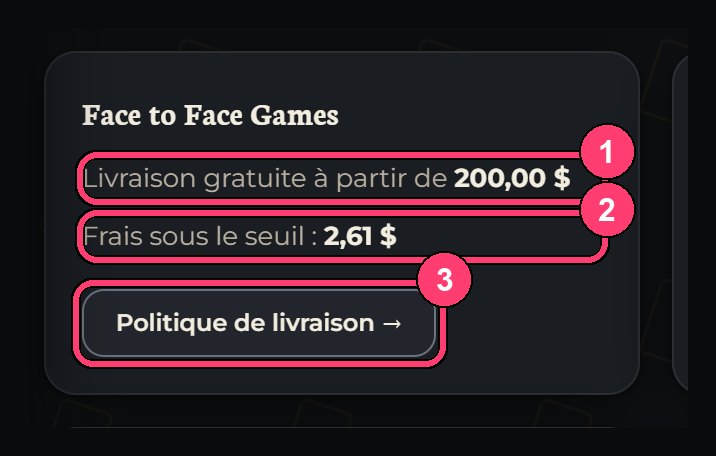
These amounts are indicative. Stores can change their fees at any time without telling Tapt, so always confirm the final amount on the store's website before paying.
Once you have spotted the offers you want, you add them to your shopping list, then click "Open at a store". About half of the stores receive your cards directly in their cart. For the others, their website does not allow filling a cart from the outside, and Tapt opens one tab per card. A small browser bookmark, the cart assistant, solves that case on nine stores by adding your cards in a single click.
A concrete example, step by step
You are looking for a Sol Ring for a new Commander deck and you have no edition preference. Here is how to proceed.
1. Type Sol Ring in the comparator and start the search in Quick mode. 2. Look at the Stacks view: spot the different printings and their artwork. If one appeals to you, note its edition. 3. Filter on LP or NM condition depending on your budget and on the regular finish to remove foil offers. 4. Compare the two or three best offers in the List view, keeping each store's free-shipping threshold in mind. 5. If you have other cards to buy, add them to the same shopping list to reach one store's free-shipping threshold.
That last step often comes as a surprise: grouping three small cards in the same store sometimes costs less than buying them separately at the three lowest prices, because the shipping fees disappear. That is exactly what the deck comparator does at the scale of fifty or a hundred cards, and what the article how to compare the price of a Magic deck describes.

When to wait instead of buying
A price is never fixed. A card that just shone in a tournament can climb fast, then fall back when demand cools; an announced reprint can push older versions down. If you are in no hurry, let Tapt watch for you. Add the card to your tracked cards, set the price you are willing to pay, and Tapt emails you when a store drops below that threshold. The details are in the article how to track a Magic card's price.
Frequently asked questions
Do I need an account to compare prices?
No. Comparing a card or a deck is free and requires no account. The free account only serves to keep your favourite stores, your decks, your collection and your price tracking.
Are the prices up to date?
Yes, at the moment you launch the comparison: Tapt reads the stores' pages at that moment. The result is kept for two minutes so as not to overload the websites, then Tapt goes back to fetch the information.
Why does a store sometimes come back empty?
Three possible reasons: its website was too slow, it was down for maintenance, or the card is out of stock. The status badge next to the store's name tells you which.
Can I get a refund or cancel a purchase?
Tapt sells nothing and takes no payment, so there is nothing to refund or cancel on its side. Refunds, returns and cancellations depend on the store where you place your order: its policy is on its own website.
What is the difference between a store's price and the LOW price?
A store's price is a specific offer, today, for a specific version. The LOW price sums up the bottom of the local market for a printing in NM condition: it helps you judge whether the offer you are looking at is good or simply the least bad of the day.
Next step
Open the comparator, look up a card you have wanted for a long time and let Tapt read the stores. If you want to understand the project behind the tool, read welcome to the Tapt blog. For a specific question, the FAQ answers the most frequent ones.
- compare Magic card prices
- Quebec Magic store
- Magic price comparison
- buy Magic cards cheap
- Sol Ring price
Comments 0
Sign in or create your account to leave a comment.
No comments yet.